【JP,EN,中文,한국어】VRC卓球ギミック VRC Table Tennis Gimmick
- ダウンロード商品本体 / Full Package¥ 2,400
- ダウンロード商品説明書のみ / README Only¥ 0無料ダウンロードVRCTableTennis_README.zip(17.7 KB)VRCTableTennis_README.zip
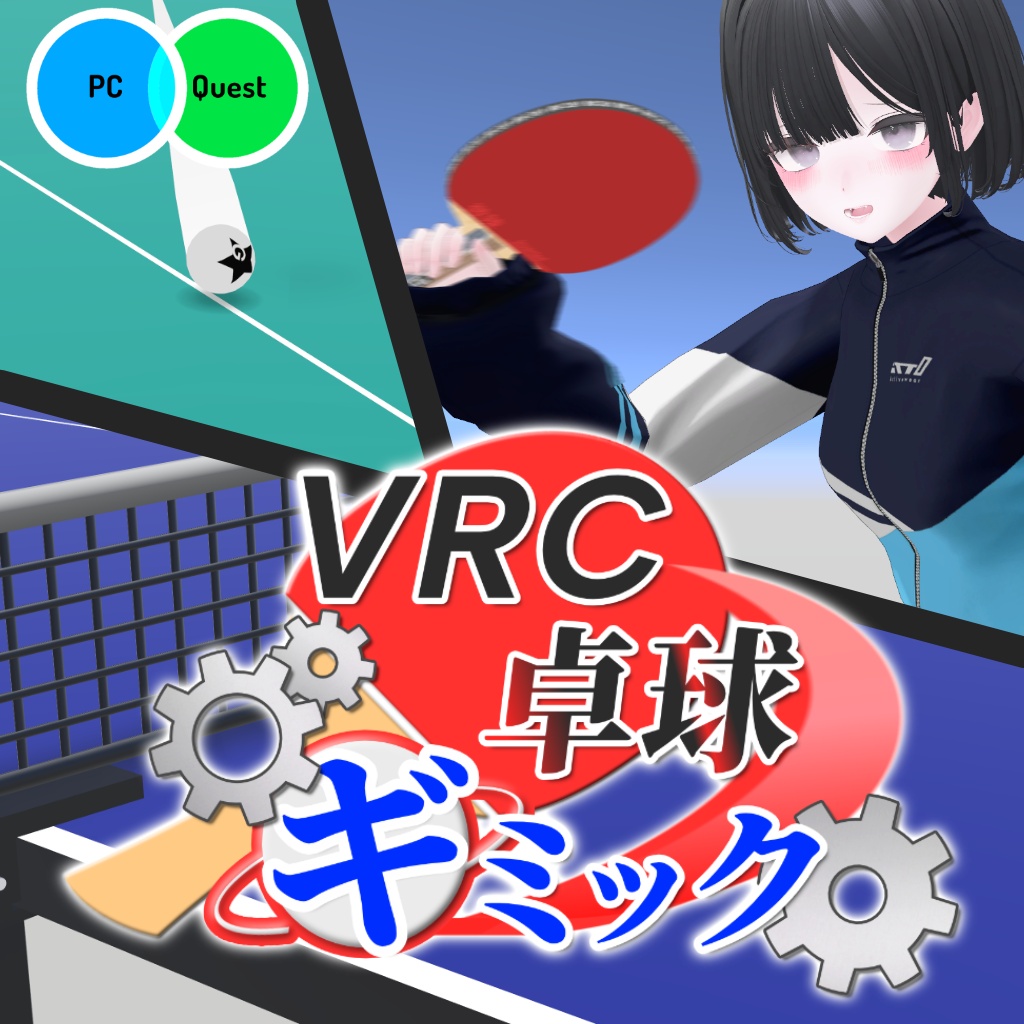
VRChatで訪問数400,000を突破した「VRC卓球」待望のギミックが販売!! ワールドに置くだけで超リアルな卓球が楽しめます✨ 🌐 日本語対応 / English supported / 支持简体中文 / 한국어 지원 ▼ ご購入前に「VRC卓球」ワールドでお試しいただけます https://vrchat.com/home/world/wrld_18e01005-beb8-4a28-bb74-f789de8494a7/info English description below
VRC卓球ギミック4つの特長🏓
1.【回転のシミュレート】 独自の物理演算を搭載したギミック。 現実さながらの回転で、曲がる球も打てちゃう!? 打った球の回転数は、ネットの上に表示されます。 2.【カスタマイズできるラバー】 テンション / 粘着 / 表ソフト / ツブ高 の四種のラバーから、 あなた好みのラケットを作ろう! 赤面・黒面それぞれ別のラバーを選べます。 3.【CPUモード】 一人でも安心のCPU対戦! 強さは、ふつう / つよい / 超つよい の三段階から選べます。 4.【自動試合モード】 点数のカウントや、反則の検出はすべて自動で処理されます。 11点先取のシングルスで、相手は人でもCPUでもOK!
さらに!
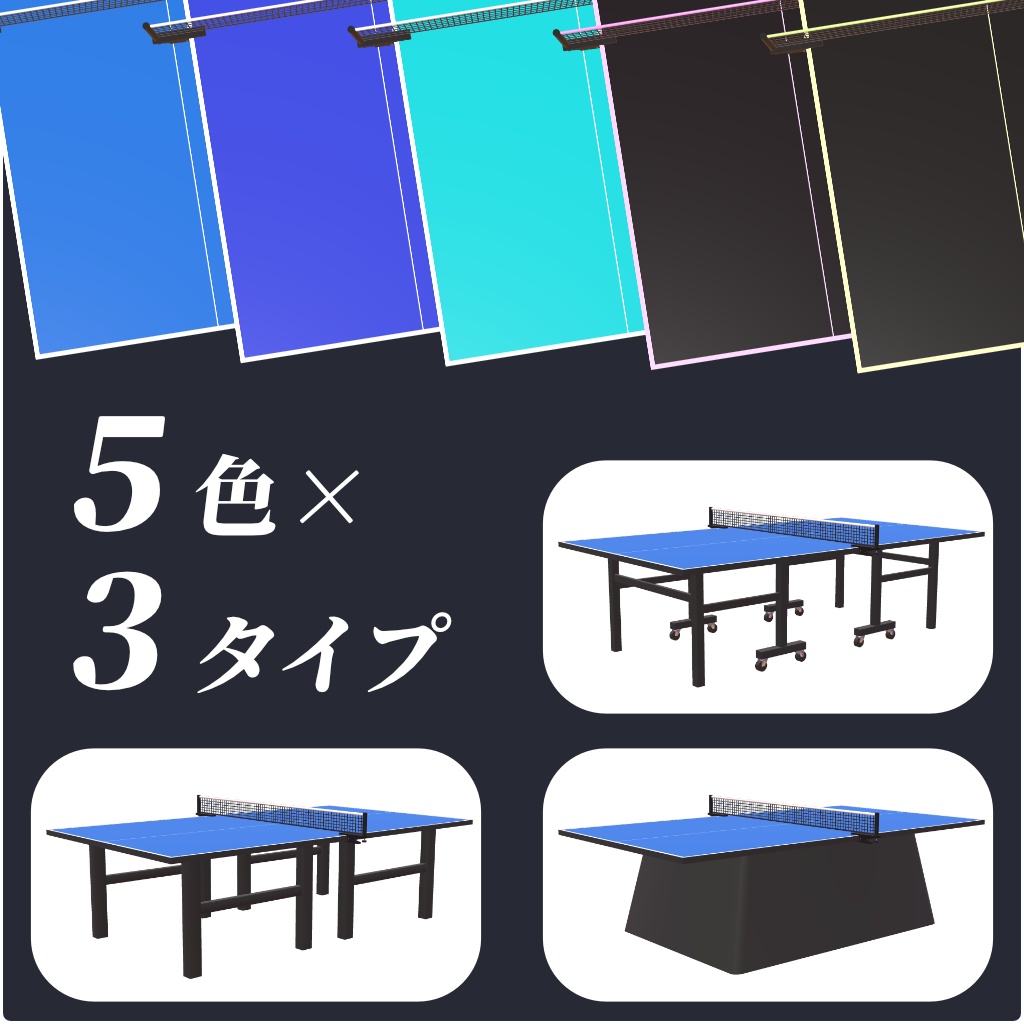
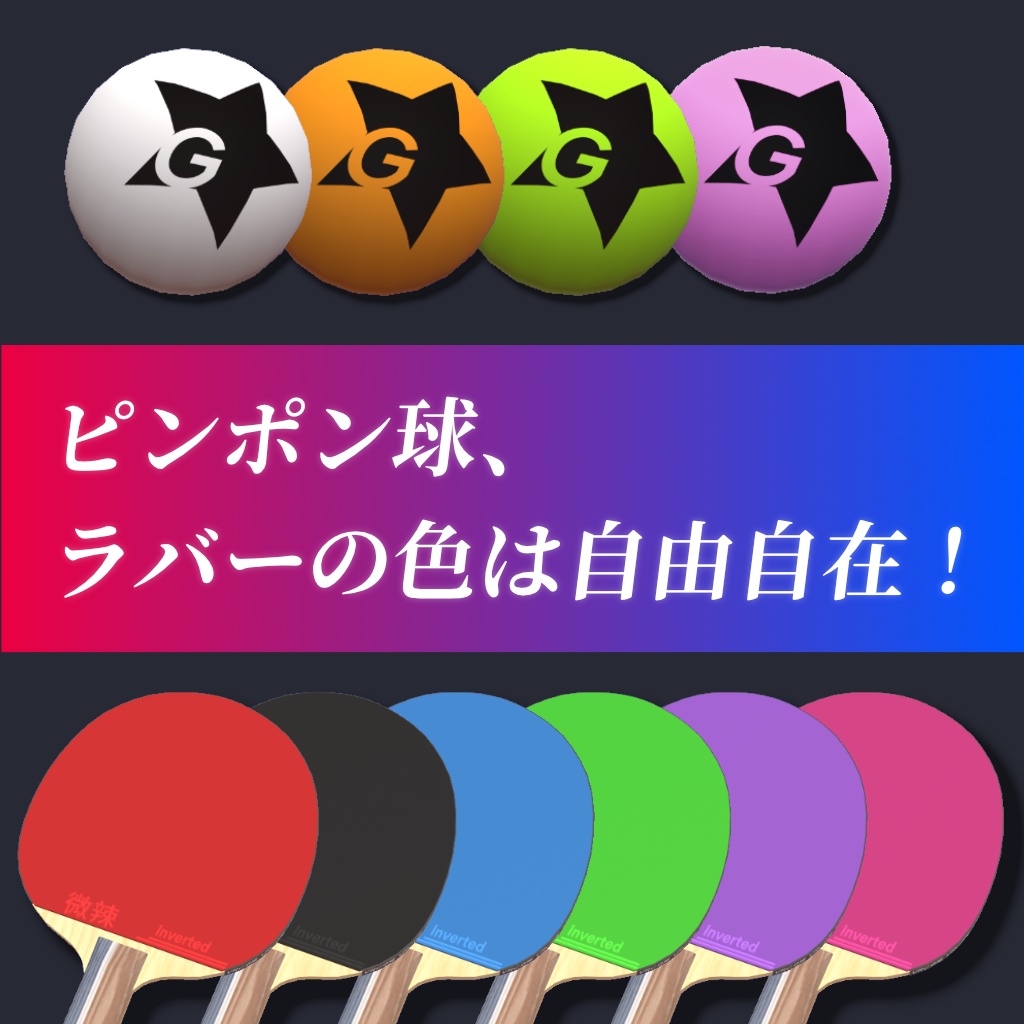
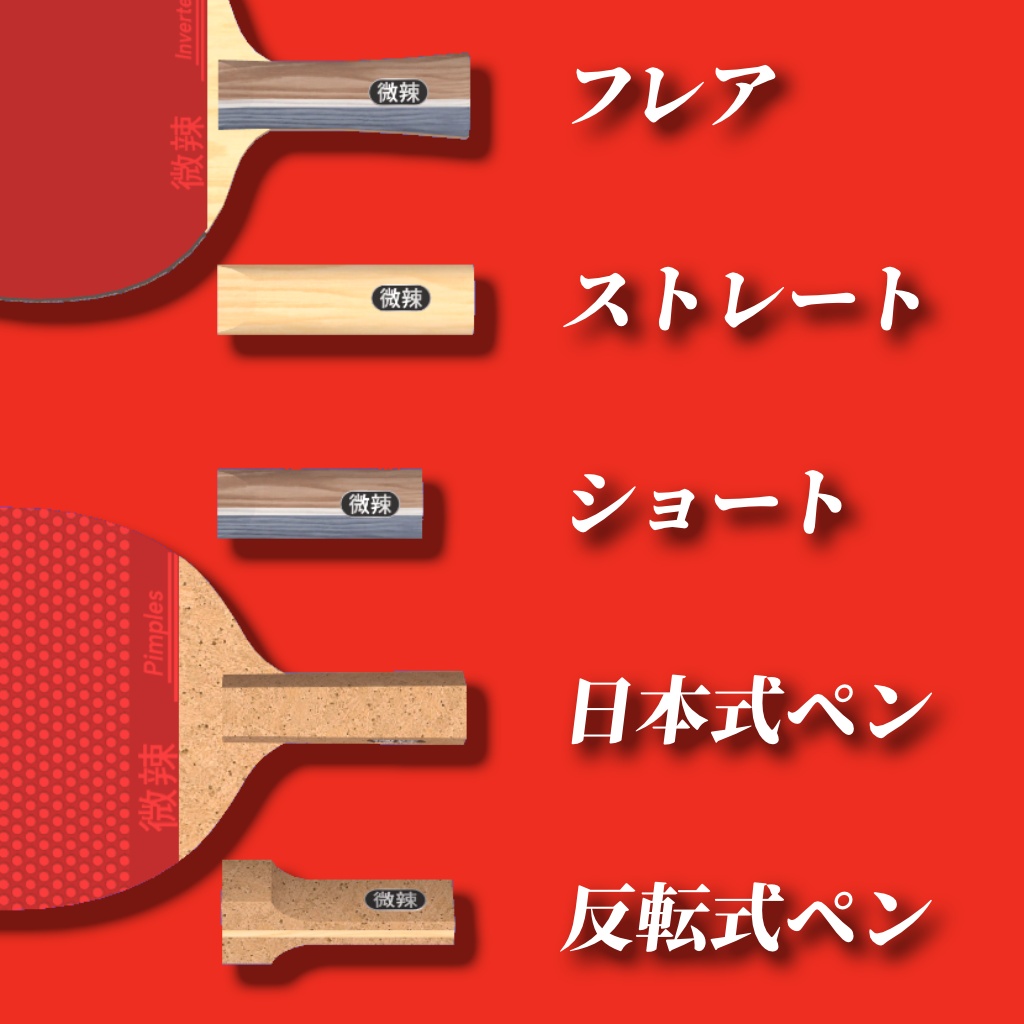
◆ VR・デスクトップ両対応 ・VR:ラケットを握って振って打ちます。サーブは球をトスして打ちます ・デスクトップ:台全体を見渡す視点に切り替わり、マウスでラケットを操作します ◆ 練習モードも充実 ・球出し練習、ミラー練習、ダブルスの練習ができます ・名前・使っているラバー・点数を台の横のパネルに表示します ◆ 4言語対応 ・日本語 / English / 简体中文 / 한국어 ・プレイヤーが自分の画面だけ言語を切り替えられます ◆ 置くだけで動く ・Prefabをシーンにドラッグ&ドロップして、そのままアップロードするだけで遊べます。 配線や設定の作業はありません ・置く位置・水平方向の向き・床の高さは自由です。複数台も置けます ・置き方に問題があると、Inspectorが自動で点検して警告を出します ◆ 見た目を自由に変えられる ・「Look (見た目)」にPrefabをドラッグするだけで差し替えられます。位置合わせは不要です 卓:3種類(標準 / キャスター付き / 台座) ラケット:5種類(シェイク3種・ペン2種) 色違い:卓4色・ラバー6色・球3色 ・球の色を変えると、球の軌跡の色も自動で合わせます ・自分のモデルに差し替えることもできます ◆ 卓ごとに細かく調整できる ・卓のInspectorで、ラバーの性能・CPUの強さ・球の速さ・効果音・コントローラーの振動などを 卓ごとに変えられます(Inspectorの表示も4言語対応) ◆ 更新しても設定が残る ・新しい版を上書きで読み込んでも、置いた卓の位置・向き、見た目の変更、Inspectorで変えた値は保たれます
動作環境
・Unity 2022.3(VRChatが推奨するバージョン) ・VRChat SDK - Worlds 3.10 以降(UdonSharpを含みます) ・PC / Android(Quest) ※VRChat Creator Companion(VCC)で作成したワールドプロジェクトでご利用ください
内容物
・GuttyWorkshop_TableTennis_v1.0.0.unitypackage - TableTennis.prefab(シーンに置く卓) - 見た目の差し替え用Prefab(卓3種・ラケット5種・球) - 色違いのマテリアル(卓4色・ラバー6色・球3色) - 説明書・クイックスタート(日本語 / English)
導入方法
1. unitypackageをプロジェクトに読み込みます 2. Assets/GuttyWorkshop/TableTennis/TableTennis.prefab をシーンへドラッグ&ドロップします 3. そのままアップロードすれば遊べます ※読み込み中に「TMP Importer」という画面が出たら「Import TMP Essentials」を押してください くわしくは同梱の README_JP.txt / JP_クイックスタート.txt をご覧ください。
注意事項
・Publicで公開するワールドに設置するのは3台までにしてください。 4台以上を設置して公開したい場合は、事前にお問い合わせください。 ・「VRC卓球」ワールドにはワールド専用の機能も含まれます。以下の機能は本商品に含まれません チュートリアル / 自動写真撮影 / カスタム球出し機 / 持ち方の記録 / ダブルスの自動試合 / 紹介画像以外のラケット ・卓の大きさは1(実寸)のままにしてください。傾けて置くこと(X・Z軸の回転)はできません ・複数台を置くときは、卓の中心どうしを横に3.5m以上、または縦に9m以上離してください ・Prefabの展開(Unpack)はしないでください。展開すると今後の更新が反映されなくなります
利用規約
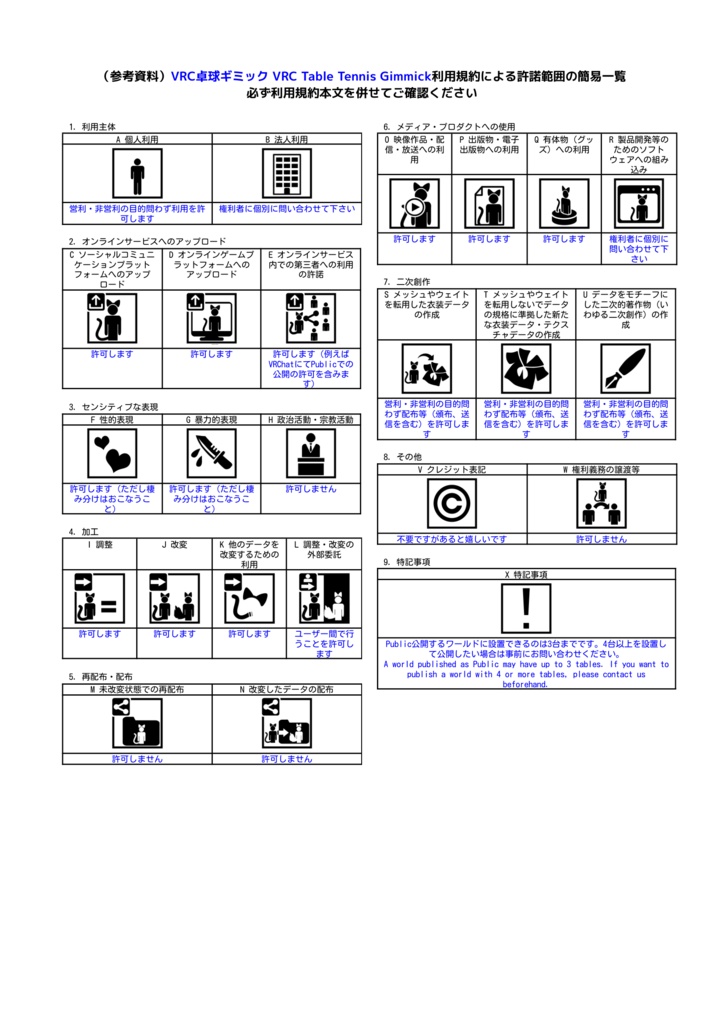
本商品は「VN3ライセンス」を採用しています。 ご利用の前に、画像の利用規約を必ずご確認ください。 ▼ 特記事項 ・Public公開するワールドに設置できるのは3台までです。 4台以上を設置して公開したい場合は、事前にお問い合わせください。 ※同梱のフォント・効果音・シェーダーは、それぞれの配布元のライセンスにも従います (くわしくは同梱の README と ~System/Licenses フォルダをご確認ください)
クレジット
・システム・プログラム:Gutty(Gutty Workshop) ・卓球台・ラケット・ピンポン球のモデル:荒川れぃ ・フォント:Noto Sans JP / SC / KR(SIL Open Font License 1.1) ・シェーダー:TextMesh Pro(Unity Companion License)、Unity標準シェーダー(MIT License)を元にしています ・効果音: 小森平 様「無料効果音で遊ぼう!」 Springin' Sound Stock ニコニ・コモンズ nc162003 / nc162004
更新履歴
2026/11/1 v1.0.0 公開
お問い合わせ
不具合のご報告・ご質問・4台以上の設置や法人利用のご相談は、 BOOTHのメッセージ または X(@gutty_h_vrc)までお願いします。 不具合のご報告の際は、VRChatのログ(output_log)と版数(v1.0.0など)を添えていただけると助かります。
English
The long-awaited gimmick from "VRC卓球", a VRChat world with over 400,000 visits, is now on sale!! Just drop it into your world and enjoy super-realistic table tennis ✨ 🌐 日本語対応 / English supported / 支持简体中文 / 한국어 지원 ▼ Try it before you buy in the "VRC卓球" world https://vrchat.com/home/world/wrld_18e01005-beb8-4a28-bb74-f789de8494a7/info * Please keep it to 3 tables or fewer in a world published as Public. If you want to publish a world with 4 or more tables, please contact us beforehand.
4 highlights of VRC Table Tennis Gimmick 🏓
1. [Spin simulation] Powered by our own physics engine. Realistic spin lets you hit even curving shots!? The spin rate of each shot is shown above the net. 2. [Customizable rubbers] Build your own racket from 4 types of rubber: Tension / Tacky / Short pips / Long pips! Choose a different rubber for each side. 3. [CPU mode] No partner? Play against the CPU! Choose from 3 levels: Normal / Strong / Very strong. 4. [Auto match mode] Scoring and fault detection are all handled automatically. 11-point singles, against people or the CPU!
More features
◆ VR and desktop - VR: Grab the racket and swing to hit. To serve, toss the ball and hit it - Desktop: The view switches to an overhead view of the table, and you move the racket with the mouse ◆ Practice modes - Ball-feed practice, mirror practice and doubles practice - Names, rubbers in use and the score are shown on the panel beside the table ◆ 4 languages - Japanese / English / Simplified Chinese / Korean - Each player can switch the language on their own screen ◆ Just drop it in - Drag the prefab into your scene and upload. No wiring or setup needed - Place tables anywhere, facing any horizontal direction, at any floor height. Multiple tables are supported - The Inspector checks your placement and warns you if something is wrong ◆ Customizable looks - Just drag a prefab into "Look (見た目)" to swap it. No positioning needed Tables: 3 types (standard / with casters / pedestal) Rackets: 5 types (3 shakehand, 2 penhold) Colors: 4 table colors, 6 rubber colors, 3 ball colors - The ball trail automatically matches the ball color - You can also use your own models ◆ Per-table tuning - In the table's Inspector, you can adjust rubber performance, CPU strength, ball speed, sound effects, controller haptics and more for each table (the Inspector is also in 4 languages) ◆ Your settings survive updates - When you import a new version over the old one, your table positions and rotations, look changes and Inspector settings are kept
Requirements
- Unity 2022.3 (the version recommended by VRChat) - VRChat SDK - Worlds 3.10 or later (includes UdonSharp) - PC / Android (Quest) * Please use it in a world project created with the VRChat Creator Companion (VCC)
Contents
- GuttyWorkshop_TableTennis_v1.0.0.unitypackage - TableTennis.prefab (the table you place in your scene) - Prefabs for swapping looks (3 tables, 5 rackets, ball) - Color variation materials (4 table colors, 6 rubber colors, 3 ball colors) - Manual and quick start (Japanese / English)
Setup
1. Import the unitypackage into your project 2. Drag Assets/GuttyWorkshop/TableTennis/TableTennis.prefab into your scene 3. Upload as is, and it's ready to play * If a "TMP Importer" window appears while importing, click "Import TMP Essentials" For details, see the bundled README_EN.txt / EN_QuickStart.txt.
Before you buy
- Doubles is practice only (no doubles matches) - The "VRC卓球" world also has world-only features. The following are not included in this product: tutorial / auto photo / custom ball feeder / grip memory / supporter perks - Keep the table at scale 1 (real size). It cannot be tilted (no X or Z rotation) - When placing multiple tables, keep their centers at least 3.5 m apart side by side, or 9 m apart end to end - Do not unpack the prefab. If you unpack it, future updates will not be applied
Terms of use
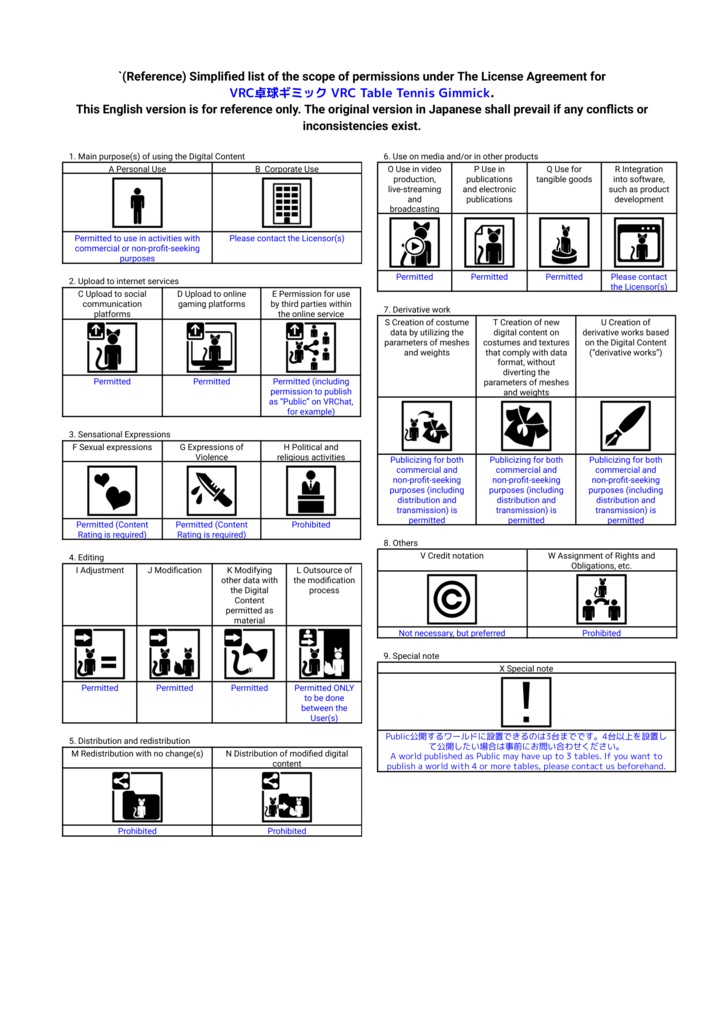
This product uses the VN3 License. Please read the terms (【PDF location】) before use. ▼ Summary (please refer to the full terms for the official content) - Individuals: commercial and non-commercial use allowed - Corporations: please contact us - Uploading to VRChat etc. and publishing as Public: allowed - Modification: allowed - Redistribution, or distributing modified data: not allowed - Use in videos, streams, publications and goods: allowed - Use for political or religious activities: not allowed - Credit: not required, but appreciated (©GuttyWorkshop) ▼ Special notes - A world published as Public may have up to 3 tables. If you want to publish a world with 4 or more tables, please contact us beforehand. - The bundled table, racket and ball models (by 荒川れぃ), fonts and sound effects may only be used within the terms of their respective rights holders, regardless of the scope of these terms. (See the bundled README and the ~System/Licenses folder)
Credits
- System and programming: Gutty (Gutty Workshop) - Table, racket and ball models: 荒川れぃ - Fonts: Noto Sans JP / SC / KR (SIL Open Font License 1.1) - Shaders: based on TextMesh Pro (Unity Companion License) and Unity built-in shaders (MIT License) - Sound effects: Taira Komori "無料効果音で遊ぼう!" Springin' Sound Stock niconi commons nc162003 / nc162004
Update history
2026/11/1 v1.0.0 released
Contact
For bug reports, questions, or requests about 4+ tables or corporate use, please contact us via BOOTH message or X (@gutty_h_vrc). When reporting a bug, please include your VRChat log (output_log) and the version (e.g. v1.0.0).